SaaS Website Architecture: A Buyer-Led Framework for Product, Docs and Content
A SaaS site is rarely just a marketing website. It may include a public product site, a knowledge base, technical documentation, a blog, a customer academy, a changelog, and an authenticated application. Each area serves a different audience, but all of them live under one brand—and they can either guide a buyer forward or leave them navigating a collection of disconnected pages.
SaaS website architecture is the deliberate way those pages are grouped, named and linked. It helps a prospective buyer find the answer that fits their question, helps a current user reach product guidance, and gives search engines crawlable paths to important public pages.
This is not another technical SEO checklist or migration guide. AmysBrew already has a SaaS SEO audit checklist and a SaaS website migration SEO guide. This article addresses the planning problem those posts do not: deciding which kinds of pages a SaaS site needs, where they belong, and how their links should support different buyer and customer journeys.
The short answer
Organise a SaaS site around distinct jobs, not around internal departments or every possible keyword. Create clear homes for the product, features, solutions, use cases, integrations, pricing, documentation, and educational content where those needs exist. Connect them with descriptive links so a reader can move from a question to a useful next step.
Do not create a new URL just because a keyword tool produces another phrase. A separate page earns its place when it answers a meaningfully different question, has distinct evidence or examples, and offers a useful path beyond itself.
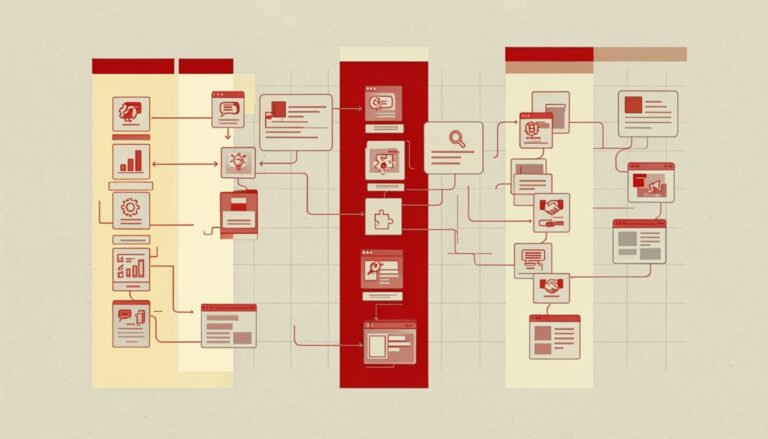
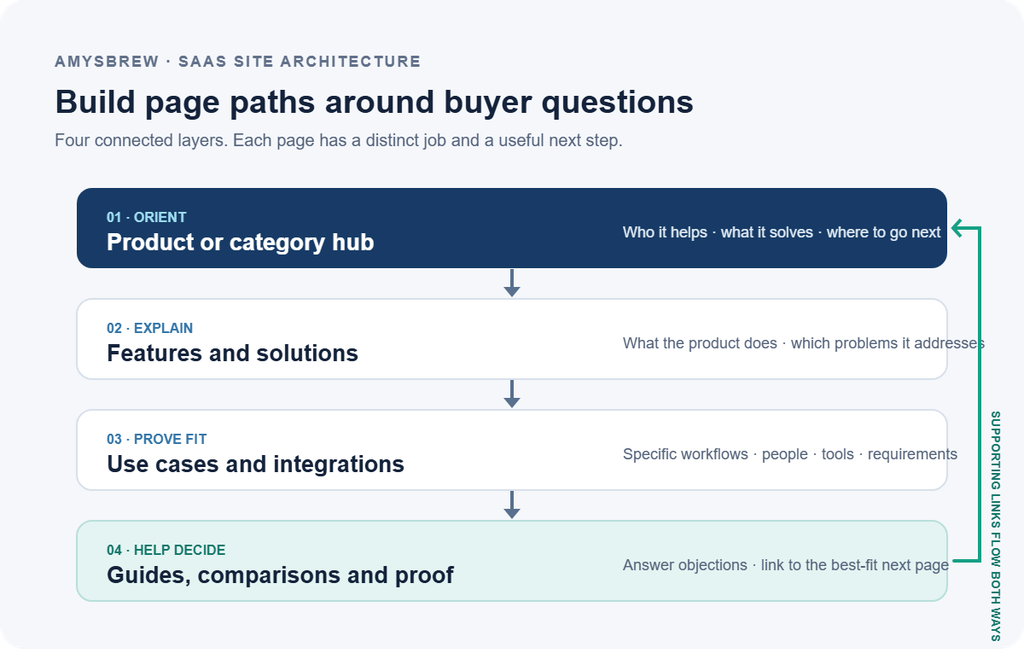
Infographic: the buyer-led SaaS site map
Why SaaS site structure gets complicated
Traditional company sites often have a few stable sections: what the company does, who it serves, how to get in touch. SaaS sites grow around a changing product. Teams add features, integrations, industries, customer types, documentation and launch pages. Meanwhile, marketing creates articles for search and product teams build guidance for existing users.
Without shared rules, this growth creates familiar problems:
- A feature page and a use-case page explain the same value in nearly identical language.
- A blog answers a question but never links to the product page that solves it.
- Documentation describes product capabilities more completely than the marketing site, but buyers cannot find it.
- Multiple URL paths create competing versions of a page or contradictory product facts.
- Every department builds its own navigation labels, so the same product area appears under different names.
- Important pages exist but are several clicks away from the pages visitors and search engines already reach.
- A product app exposes private or low-value URLs that were never intended as public search results.
These are architecture questions before they are writing problems. Publishing more pages on top of a confusing structure usually makes the confusion harder to unwind.
Model the site by audience and task
Start by listing the groups who use or evaluate the site and what each is trying to accomplish. Keep the list practical; it does not need a large persona exercise. Product marketers, technical evaluators, economic buyers, current users and developers may all arrive at different pages with different questions.
| Audience or role | Typical question | Page type that may answer it | Useful next step |
|---|---|---|---|
| Problem owner | “Can this solve the workflow that is slowing us down?” | Solution or use-case page | Review the product workflow or relevant case evidence |
| Practitioner | “What will I do in the product?” | Feature page, tutorial or demo | Explore a workflow, trial or related feature |
| Technical evaluator | “Will it fit our stack and requirements?” | Integration, security, architecture or technical docs | Read implementation details or request a technical conversation |
| Budget owner | “How does this compare, and what will it cost?” | Pricing, comparison, ROI or evaluation page | Compare scope, pricing and risk |
| Existing customer | “How do I configure or troubleshoot this?” | Product documentation or support resource | Follow a task-specific setup or troubleshooting path |
| Developer or partner | “How do I authenticate, configure or extend it?” | API docs, integration docs or developer portal | Open the relevant technical reference or sandbox |
These page types are not a mandatory checklist. They are a decision tool. If an audience has no real question that a page can answer uniquely, do not add that page merely to make the site map look complete.
A practical architecture for a B2B SaaS site
The table below is a starting model. Some businesses will combine sections; others will need a dedicated technical or partner area. What matters is the purpose of each page and its connections to related pages.
| Layer | Example URL pattern | Main job | Link connections |
|---|---|---|---|
| Product or category hub | /product/ | Explain the product category, audience, core value and product areas | Links to major features, solutions, integrations and pricing |
| Feature pages | /features/workflow-automation/ | Explain one capability with product evidence and limits | Links to use cases, relevant integrations, docs and product hub |
| Solution or industry pages | /solutions/finance-teams/ | Explain how a set of capabilities fits a buyer’s context | Links to features, compliance details, integrations and proof |
| Use-case pages | /use-cases/close-month-end/ | Show a concrete job, user, workflow and outcome | Links to relevant features, templates, docs and case evidence |
| Integration pages | /integrations/salesforce/ | Explain connection, supported data, setup and limitations | Links to docs, use cases and product features involved |
| Pricing and evaluation | /pricing/, /compare/ | Help buyers assess scope, commercial fit and alternatives | Links to product evidence, implementation and contact paths |
| Documentation | /docs/ or a dedicated docs host | Help customers and technical evaluators complete a task | Links to product pages where context helps; docs navigation remains task based |
| Editorial resources | /blog/, /guides/ | Explain problems, answer research questions and support evaluation | Links to a useful hub or product page and to related educational content |
Use these URL examples as examples only. Google says it primarily understands site structure through links between pages, rather than by inferring hierarchy from URL wording alone. The URL should still be readable and stable, but the actual link paths must make the relationship clear. See Google’s guidance on crawlable links and descriptive anchor text.
Feature pages and use-case pages are not interchangeable
A feature page describes what a product capability does. A use-case page explains who uses the product, for which job, in what context and with what constraints. For example, a feature page might describe automated reconciliation. A use-case page might show how a finance operations team uses reconciliation to close a month-end process across several entities.
Those pages can share product facts, but their centre of gravity differs. The feature page should help a reader understand the capability; the use-case page should help them recognise their own situation and evaluate fit.
| Question | Feature page | Use-case page |
|---|---|---|
| What is the page about? | A capability or product area | A job, role, industry or workflow |
| What evidence belongs here? | Product screenshots, configuration details, limits | Workflow steps, audience context, real examples, expected outcomes |
| What should it link to? | Docs, related use cases, integration pages | Features used in the workflow, case evidence, implementation material |
| When should there be two pages? | When the feature is useful across several contexts | When a distinct audience or workflow has genuinely different needs |
| When is a combined page better? | When the capability has one narrow use and no distinct supporting information | When a separate use-case page would repeat the feature page with a swapped heading |
Before splitting a page, compare the top search results and the buyer questions gathered from sales or product. If the audience, task and evidence are the same, one complete page may serve readers better than two near-duplicates. If those differ, separating the pages can create a clearer experience and a more useful internal link path.
Give product documentation a deliberate place
Documentation is often built for current customers first. That is reasonable: its main goal is to help someone complete a task accurately. But documentation can also influence a purchase when a technical buyer wants to confirm setup requirements, API support, security controls or integration behavior before speaking with sales.
Decide which documentation should be publicly discoverable and how a prospective buyer can reach it. A technical evaluator might need an implementation overview or integration guide; an existing user might need a step-by-step troubleshooting page. They may sit in one documentation system, but the navigation and entry points should reflect those different needs.
Do not turn every support ticket into a public SEO landing page. First check whether the answer is general, accurate, safe to share and likely to help more than one user. Account-specific instructions, sensitive security details or rapidly changing operational notes may belong behind authentication.
Documentation decision table
| Content | Public by default? | Why | Recommended connection |
|---|---|---|---|
| Product overview for evaluators | Usually yes | Helps a buyer understand capabilities and requirements | Link from product, integration and solution pages |
| API reference | Often yes, if intended for developers | Can support technical evaluation and implementation | Link from developer and integration pages |
| Customer-specific setup | Usually no | May contain account details or configuration that should not be public | Keep behind the authenticated app or help system |
| Troubleshooting for common product issues | Depends on support policy | Public answers can help users, but must be accurate and maintained | Link from support navigation and relevant product documentation |
| Internal launch notes or unreleased functionality | No | Not intended for public evaluation and may become outdated quickly | Keep in internal product systems |
The rule is not “all docs on the root domain” or “all docs on a subdomain.” It is: choose the host and platform that the team can maintain, then create clear navigation and contextual links between public docs and the marketing site. Platform, security, engineering ownership and analytics constraints may matter more than a simplistic URL preference.
Treat the application separately from the marketing site
The authenticated app has a different job from the public marketing site. Most dashboard screens, account records and user-specific workflows are not useful landing pages for an unqualified search visitor. Make clear which parts of the app are private, which product documentation is public, and where public product explanations live.
For public feature pages, show enough evidence to explain the capability without requiring an account. For in-app screens, follow the product’s access and privacy model. Avoid relying on a blanket setting without testing representative URLs: a marketing page that should be indexed and a customer workspace that should not have very different requirements.
Pick URL patterns that the team can maintain
Readable URLs make pages easier to understand and share, but an elegant URL tree is not a substitute for a useful page model. Choose short, consistent paths that match the site’s navigation and will survive normal product naming changes.
| Decision | Questions to ask before choosing |
|---|---|
| Subdirectory or separate docs host | Can the CMS or documentation platform support the required navigation, redirects, access control and publishing workflow? Who owns updates? |
/features/ vs /product/ | Does the label match how visitors think about the product, and will new pages fit naturally underneath it? |
| Role pages vs industry pages | Do those audiences have distinct use cases and proof, or would the pages repeat the same product description? |
| Dated campaign URLs vs evergreen resources | Is the page genuinely tied to a specific launch or event, or should it remain useful after the date passes? |
| Product name in URL | Is the product name stable enough to be part of the URL, or might a rebrand create avoidable redirects? |
If the content is substantially the same at multiple URLs, decide which version should be canonical and clean up the paths. Google’s canonicalization guidance explains that canonical signals are hints and that Google can choose another representative URL when the signals conflict.
Build internal links around the next useful decision
Internal links should help a person continue the same task. They also help search engines discover pages and understand the relationships among them. Google’s link guidance recommends actual crawlable links and descriptive, concise anchor text; it also says every important page should be linked from at least one other page.
Think in routes rather than a fixed quota of links:
Educational question → relevant product context → proof or implementation detail → appropriate next step.
A guide about forecasting might link to the forecast feature page where that is a genuine solution, then to its product documentation or a case example. The product page can point back to the guide if it helps explain the problem. A general “Book a demo” button may still be useful, but it should not be the only route for readers who need more information first.
Internal link map example
| Source page | Link phrase to use naturally | Destination | Why the link helps |
|---|---|---|---|
| Educational article on a workflow | “workflow automation feature” | Relevant feature page | Moves from problem education to product capability |
| Feature page | “setup steps for the Salesforce integration” | Integration documentation | Helps a technical evaluator verify implementation |
| Use-case page | “how month-end reconciliation works” | Product walkthrough or guide | Adds detail for a practitioner |
| Comparison page | “implementation requirements” | Technical evaluation page | Answers a late-stage risk question |
| Product hub | “pricing and plan details” | Pricing page | Gives the buyer a clear commercial path |
Avoid identical keyword-heavy anchors on every link. Use a phrase that accurately describes the destination in its sentence. Google specifically warns against cramming related keywords into anchor text; natural variety is more useful to readers than engineered repetition.
Do not confuse click depth with a universal ranking rule
It is useful to make important pages easy to reach. That does not mean every site has to obey an exact “three clicks from the home page” rule. Page importance, menu design, topic relationships, user needs and crawler access all matter. A page can be reachable through a strong topic hub even if it is not a top-level menu item.
Instead of treating click depth as a pass/fail number, ask:
- Can a relevant user find this page from the page they are likely to visit first?
- Does the link context explain why this destination is useful?
- Can the page be reached through a standard crawlable link, not only an interaction that search engines cannot reliably interpret?
- Do the links and navigation reflect the page’s actual importance?
- Can a reader continue to the next stage without repeatedly returning to search or the main menu?
Google’s site-structure guidance describes how it can use link relationships and the number of links to infer relative importance. Although the article is written for ecommerce, the principle of clear navigation and meaningful internal paths also applies to SaaS product pages.
Decide whether a page deserves its own URL
Before publishing a new feature, vertical, persona, integration or use-case page, use a page qualification test.
| Test | Strong reason for a separate page | Warning sign that it may be duplicate |
|---|---|---|
| Search intent | The query results and buyer task are meaningfully different | Only the keyword wording changes |
| Audience | The page serves a distinct role or company context | The audience label changes but objections and proof do not |
| Product evidence | There are unique workflows, screenshots, requirements or examples | The page repeats generic product benefits |
| Conversion path | The next step differs for this buyer’s task | Every version routes to the same generic CTA with no additional value |
| Maintenance | A named owner can keep the information current | Nobody knows who updates the page when the product changes |
If a page passes only one test, consider strengthening an existing page instead. A single well-organised solution page can be more helpful than a dozen thin industry variations.
A practical architecture workflow for a SaaS team
Use this process when the website has grown organically or a new product area needs a content plan.
Step 1: Inventory the page families
Export the live URLs and group them by purpose: product, feature, solution, use case, integration, pricing, documentation, blog, guides, customer evidence and application. Do not begin by deciding which page is “good” or “bad.” First understand what exists and which team owns it.
Step 2: Add buyer question and owner
For each important page, record the audience, question answered, page owner, unique proof, intended next step and update trigger. If those are unknown, interview the people closest to the work. Sales calls, support questions and product documentation often expose a page’s true purpose better than its current URL.
Step 3: Group by intent and evidence
Cluster pages that answer the same task. Compare not only wording but also evidence, product functionality, and the path to conversion. If multiple URLs compete for the same job, decide which should lead and whether the others should be merged, redirected, or repositioned.
Step 4: Sketch the important user paths
Draw a simple path for three journeys: someone learning about the problem, someone checking technical fit, and someone comparing options. Mark where each journey starts, which pages answer the next question, and where it should end or branch.
Step 5: Add missing links before inventing missing pages
Sometimes the content already exists but is hard to find. Add links from relevant hubs, feature pages, use cases, documentation and related articles first. Create a new URL only when the map reveals a genuine unanswered question or missing page purpose.
Step 6: Set publishing and maintenance rules
Agree how new pages are named, who approves product facts, how docs and marketing stay consistent, what qualifies as a separate page, and who reviews information after product changes. A small shared standard prevents the architecture from drifting back into silos.
Step 7: Validate with real navigation and search data
Test the paths on mobile and desktop. Review analytics entry pages, internal search terms, Search Console page/query data, and support or sales feedback. Watch whether visitors find the next resource and whether important pages are being discovered and indexed. Treat metrics as evidence to investigate, not as proof that one architecture choice guarantees a ranking.
How to measure whether the architecture is helping
Architecture does not have one universal success metric. Pick measures related to the problem you are trying to solve and establish a baseline before changing navigation or URLs.
| Question | Useful signal | What to check beside it |
|---|---|---|
| Are key public pages discoverable? | Search Console indexing and impressions for priority URLs | Whether the page should be indexed and whether it has crawlable internal links |
| Can visitors move between related pages? | Internal click events or path exploration | Whether the source page and link wording make the next step clear |
| Are buyers reaching product detail from education? | Assisted journeys or visits to related product pages | Audience fit and quality of the source article |
| Are duplicated pages competing? | Similar queries appearing across several URLs | Whether their intent, proof and audience are truly different |
| Are technical evaluators finding docs? | Visits from product and integration pages to public docs | Whether the documentation answers the buyer’s specific concern |
| Are requests better qualified? | CRM lead quality by landing-page group | Sales definitions, sample size and attribution limits |
Common SaaS architecture mistakes
Building the sitemap around the org chart
Department names may make sense internally but often tell visitors little. The site structure should use product and buyer language where possible, while still reflecting actual ownership behind the scenes.
Making every keyword its own page
Keyword variations do not automatically represent different intentions. Validate the distinction with search results and buyer evidence before creating separate pages.
Treating docs as either “SEO content” or “not marketing”
Docs primarily help users complete tasks. Some pages also support evaluation. Decide which is which and link the public material into the relevant product and integration journeys without forcing every help article into a sales funnel.
Hiding links in non-standard controls
If navigation works only through a button with a script event and no crawlable destination, it may fail users and crawlers. Use normal link markup for destinations that should be discoverable. Google’s link best practices show what crawlable links look like.
Repeating the same product copy across role and industry pages
Repeated boilerplate does not become useful because the heading changed. Add distinct context, requirements, examples and proof—or consolidate the pages.
Renaming URLs without a transition plan
Architecture improvements sometimes require URL changes. Plan redirects, update internal links, update sitemaps and monitor the transition. For the migration-specific process, use the existing SaaS website migration SEO guide rather than duplicating its steps here.
FAQs about SaaS website architecture
What is SaaS website architecture?
It is the way a SaaS company groups and connects its public website pages, product information, documentation and related resources so different audiences can find the information they need.
What pages should a SaaS website have?
Most SaaS sites need a clear product or category overview, relevant feature or solution pages, pricing or evaluation information, and a route to support or documentation. Use-case, integration, comparison, security and educational pages should be added when they answer distinct buyer questions and can provide unique value.
Should SaaS documentation be on the main domain or a subdomain?
There is no universal answer. Choose the platform and host the team can maintain, then make the public documentation easy to navigate and link to from relevant product pages. Security, platform limits, engineering ownership, analytics and migration effort all matter.
What is the difference between a SaaS feature page and a use-case page?
A feature page explains a product capability. A use-case page explains how a specific role, team or industry uses one or more capabilities to complete a job. Create both only when the audience, questions and evidence differ enough to justify separate pages.
Does a SaaS website need a silo structure?
Not necessarily. Clear topic groupings can help people navigate, but overly rigid silos can disconnect related product and educational content. Build connections where they help readers move between questions and solutions.
How many clicks from the home page should an important page be?
There is no universal click-depth number that guarantees a ranking. Make important pages discoverable through relevant navigation and contextual links, and test whether people can reach them from likely entry points.
How should a SaaS blog link to product pages?
Link when a product page genuinely answers the next question. Use concise, descriptive anchor text that sets the reader’s expectation. Avoid adding unrelated or repeated keyword-rich links simply to force a search signal.
Where this fits in AmysBrew’s services
Architecture decisions often cross content, product marketing and engineering. A useful site plan identifies page purpose, internal links, technical dependencies and maintenance ownership together. AmysBrew’s technical SEO and site architecture service can help teams review those relationships and prioritise changes.
For a broader view of the existing site-health process, continue to the SaaS SEO audit checklist. For practical content clarity and connections, see the AI-ready content guide and B2B content marketing strategy guide.