
A SaaS content calendar can look busy and still fail to support the business. Publishing every week does not guarantee that the pages reach the right buyers, answer distinct questions or lead naturally to a useful next step.
A content roadmap is more than a schedule. It connects priority audiences, product goals, search intent, existing pages, evidence, owners and measurement. The aim is not to publish the most articles. It is to make deliberate improvements to the set of pages that can help buyers discover, compare and evaluate your product.
If you need keyword ideas by buyer stage, start with Amy’s Brew’s 100 B2B SaaS keywords guide. This article focuses on turning validated opportunities into an ordered plan.
What is a SaaS SEO content roadmap?
A SaaS SEO content roadmap is a prioritised plan for creating, improving, consolidating and linking pages that support a company’s audience and commercial goals. It should name the reader, the page’s purpose, the evidence for doing the work, dependencies, owner and review point.
A calendar answers “when will we publish?” A roadmap also answers “why this page?”, “why now?” and “what should happen before or after it?”
1. Choose a product and audience focus
Start with one or two product areas, buyer groups or markets where the company has a credible opportunity. Use product priorities, customer conversations, sales objections, adoption data and delivery capacity. Do not choose a topic only because a keyword tool displays a large number.
Write a short focus statement: “For [buyer] in [company type], we help solve [problem] with [product capability].” If the statement is vague, the content plan is likely to be vague too.
2. Map questions across the decision journey
List questions buyers ask as they recognise a problem, explore solutions, compare vendors and validate a decision. Include the people who influence a B2B purchase: users, managers, technical reviewers, security, procurement and finance.
The goal is not to force a rigid funnel onto every query. It is to notice whether the current library serves only early education while leaving comparison and validation questions unanswered.
3. Inventory existing pages before adding new ones
Export blog posts, product pages, guides, case studies and resources. Add URL, topic, likely intent, target audience, Search Console impressions/clicks, conversion evidence, last substantive review date and internal links.
For each opportunity, choose one action:
- Keep and link: useful page with a clear role.
- Refresh: accurate topic, but facts, examples, structure or next steps need work.
- Consolidate: overlapping pages should become one stronger resource.
- Create: a genuinely missing buyer need has evidence.
- Retire or redirect: obsolete, duplicative or no longer useful.
This step reduces cannibalisation and prevents writing a second answer to a question the site already covers.
4. Validate the query and page format
Use Search Console, keyword research, sales/support language and live search results. Note the country and date. Check whether searchers expect a how-to guide, landing page, comparison, template, tool or case study.
A blog post is not the right answer to every keyword. A transactional query may need a product or service page. A comparison query may need a carefully sourced comparison. Match page type to intent before writing.
Do not treat volume, difficulty or CPC as timeless. Pull current metrics for the target geography and compare them with business fit, ranking feasibility and the ability to add something original.
5. Score the opportunity
Use a simple 1–5 rating for:
- Business fit: does the audience matter to the product?
- Evidence of need: do customer, sales or search data support the question?
- Distinctiveness: can the company contribute first-hand proof or useful expertise?
- Site opportunity: is there a gap, underperforming page or missing connection?
- Effort/dependency: how much research, design, expert review or engineering is needed?
Avoid pretending a weighted score predicts ranking. Use it to discuss trade-offs and explain why one piece comes before another.
6. Design connected page groups
For each core subject, decide the central page and supporting pages. A product or use-case page may be supported by an implementation guide, integration explainer, comparison resource, customer story and focused how-to articles.
Every page should have a distinct job. Write down what the reader should do next and which existing page provides that next step. Internal links should connect the pages in context with descriptive anchor text. Do not link mechanically or repeat one exact anchor everywhere.
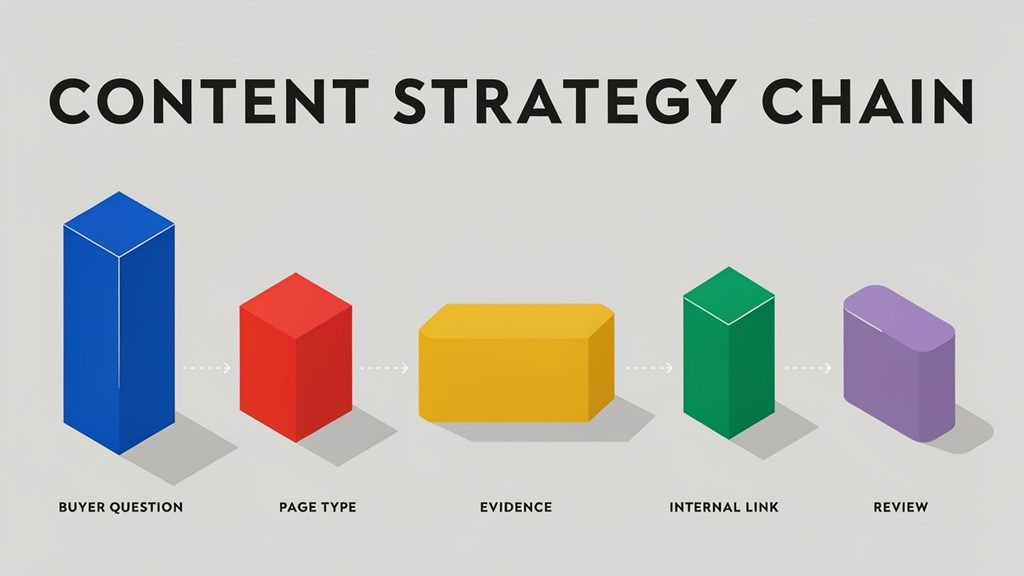
7. Sequence the work realistically
Sequence dependencies before publication. Product claims need expert review; comparison pages need careful sourcing; technical changes need developers; customer stories need permission. A useful order might be: fix a key existing page, publish its supporting guide, add proof, then build a comparison asset after product evidence is ready.
A quarterly roadmap can have three lanes:
- Improve: existing pages with verified opportunity.
- Create: new pages for distinct buyer needs.
- Enable: technical, design, measurement and research tasks.
Limit work in progress. A smaller number of well-supported pages is easier to review and connect than a large queue of thin drafts.
8. Define measures and review dates
For each item, define the signal to inspect. It may be indexation, query impressions, qualified landing-page visits, engagement with the intended next step, conversion quality or sales feedback. Add the data source and review date.
Search outcomes and SaaS sales cycles often take longer than a single quarter. A 90-day review should assess implementation and early direction, not promise a final revenue verdict. Record external changes and attribution limitations.
Example: mapping Amy’s Brew’s public content into a roadmap
Amy’s Brew’s public library includes a B2B SaaS keyword guide organised by buyer journey, an article sharing three months of SaaS content results, and a detailed AI-ready content guide. Together, these pages show how a content roadmap can connect keyword research, performance learning and practical guidance.
A team reviewing this public content could map the pages like this:
- Keep and connect: Use the keyword guide to help readers move from buyer-stage questions to relevant strategy and content-planning resources.
- Review with current evidence: Treat the results article as a record of the period it covers. Before changing its figures or conclusions, check the underlying data and make any update substantive.
- Link where relevant: Point readers to the AI-ready content guide when they need more detail on structuring and maintaining useful content.
- Choose the next page from evidence: Check current Search Console queries and customer or sales questions for needs the existing pages do not answer. Create or update a page only when that evidence supports it.
This is an illustration based on Amy’s Brew’s published pages, not a claim about its private analytics or internal planning decisions. For your own roadmap, record the audience, question, page type, evidence, proposed action, unique contribution, next step, owner, dependencies and review measure for each page
A reusable roadmap row
| Field | Example prompt |
|---|---|
| Audience | Who needs this page? |
| Question/job | What are they trying to decide or do? |
| Page type | Guide, product page, comparison, case study, etc. |
| Evidence | Search, sales, customer, product or analytics data |
| Existing-page action | Keep, refresh, consolidate, create, retire |
| Unique contribution | What can Amy/the company add that is not generic? |
| Next step | Which page or action helps the reader next? |
| Owner/dependencies | Writer, SME, design, legal, engineering |
| Success signal | What will be reviewed, from which system and when? |
The same roadmap can inform briefs, stakeholder planning and reporting. For the work after a technical review, see how to prioritise SEO audit findings. For keyword patterns by buyer stage, use the existing keyword resource.
Frequently asked questions
How many blog posts should a SaaS company publish each month?
There is no ideal number for every SaaS company. Choose a pace your team can sustain while researching, reviewing and publishing useful content. Prioritise buyer needs and quality over hitting a monthly quota.
How do I create a SaaS content calendar?
Start with a prioritised roadmap. For each page, record the audience, question, format, owner, dependencies, target date and review measure. Then schedule work around available expertise and approvals.
How do I prioritise SEO content ideas?
Compare each idea’s fit with business goals, evidence of buyer need, ability to add something distinctive, existing page overlap and effort. Check live search results and your own Search Console data before committing.
Should SaaS companies create blog posts or landing pages?
Choose the format that best serves the searcher’s intent. Use blog posts for useful explanations and how-to questions; use landing pages for product, use-case or service details and clear purchase actions. Connect related pages with helpful internal links.
CTA: Need a SaaS SEO roadmap for a specific product or market? Amy’s Brew can help prioritise the pages, evidence and owners. Get in touch to discuss your roadmap.